
Use case
AI cost billback for AI agencies
If your agency pays OpenAI, Anthropic, or other AI provider costs through central accounts while delivering work for several clients, month-end billback gets difficult quickly. Provider dashboards show organization spend — not which client should carry which line. AI Billback is built for that reporting-period workflow: import provider cost data, attribute usage to clients, review allocations, and generate client-ready AI cost statements you can use alongside your existing invoicing process. No proxy, no provider API keys, and no application changes.
No proxy · No API keys · No application changes
How do AI agencies bill clients for OpenAI and Anthropic usage?
Most agencies use one of several billing models — absorbing costs in a retainer, offering a fixed AI allowance, passing costs through at cost or with markup, or billing usage directly. The model you choose affects margin and client expectations, but every model that ties spend to clients still needs client-level attribution at the end of the reporting period.
See our guide on how agencies bill OpenAI and Anthropic costs for a full comparison of trade-offs.
How AI agencies allocate AI provider costs across clients
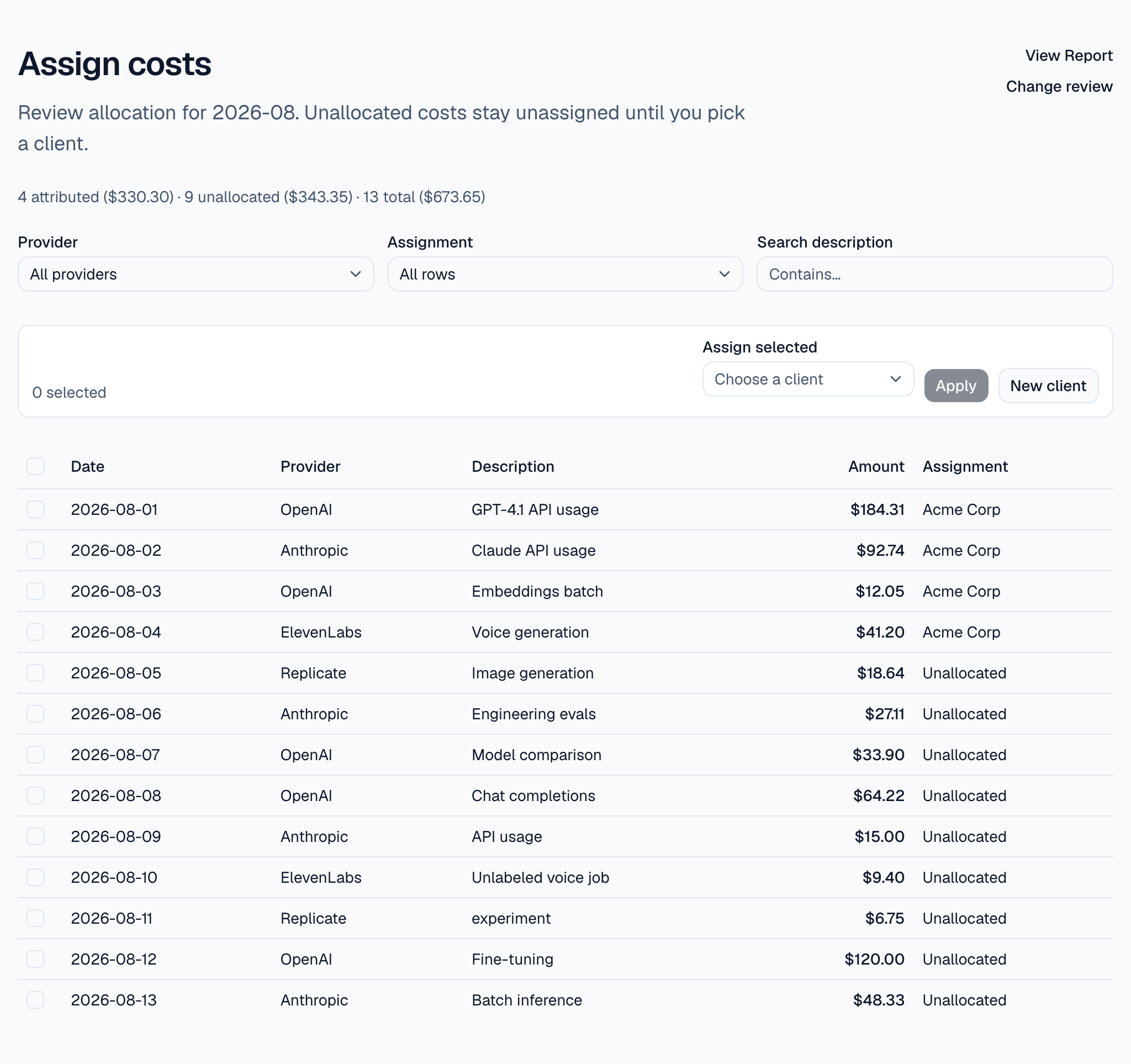
Provider spend and client cost are not the same thing. Your OpenAI or Anthropic account may show thousands of dollars for the month, but finance and client conversations require a breakdown: Client A carries this much, Client B carries that much, and anything still unallocated is visible for review.
Allocation means mapping normalized cost rows to clients using whatever signals you have — project names in exports, internal tags, attribution rules, or manual review when the source data does not identify a client. AI Billback does not infer a client where the underlying data does not support it.
Why provider dashboards alone are not enough
AI providers expose usage and cost through dashboards, exports, or APIs. That helps you gather cost data for your organization. It does not answer which client engagement should absorb each portion of that spend — that is a separate financial allocation decision your agency still has to make.
A typical multi-client agency scenario
Consider an agency delivering AI systems for four active clients from one OpenAI account and one Anthropic account. At month end, operations needs to answer:
- Which rows belong to Client A versus Client B?
- How much spend is still unallocated?
- What should each client see on an AI cost statement?
- What figure supports the AI-cost line on your invoice?
A spreadsheet can work for a while, but it breaks down as volume, providers, and reporting periods accumulate.
From provider spend to client-ready AI cost statements
AI Billback follows the workflow agencies already describe informally:
- Import AI provider cost data (CSV upload or paste).
- Assign cost rows to clients — or leave them unallocated.
- Review the allocation before you finalize.
- Open a client-ready AI cost statement for the reporting period.
- Print or save as PDF from the browser for your client file.
Raw CSV files are parsed in the browser and are not uploaded as files. Normalized cost records are stored when you save a review.
Can you pass AI API costs through to clients?
Yes — pass-through and reimbursable models are common. They require a defensible client-attributed breakdown first, not an automated invoice. AI Billback produces the cost statement; your Stripe, QuickBooks, or Xero workflow handles payment and accounting.
How do you reconcile AI provider costs at month end?
Reconciliation means your client-attributed totals plus any documented unallocated spend should align with what the provider billed for the reporting period. If they do not, you review exceptions before sending statements or updating invoices.
For a step-by-step allocation workflow, see how to allocate shared AI API costs across clients.
Why this approach: no proxy, no API keys, no application changes
AI Billback sits after provider cost data exists. It does not proxy LLM requests, require OpenAI or Anthropic API keys, or change how your applications call AI APIs. That keeps delivery architecture separate from billback operations.
What AI Billback does not replace
It is not real-time SaaS metering, invoicing software, or accounting. It does not replace OpenAI or Anthropic dashboards. It is the reporting-period allocation and client statement layer on top of cost data you already have.
Start client billback for your agency
Import provider cost data, attribute spend to clients, and open client-ready AI cost statements for your reporting period.
No proxy · No API keys · No application changes